
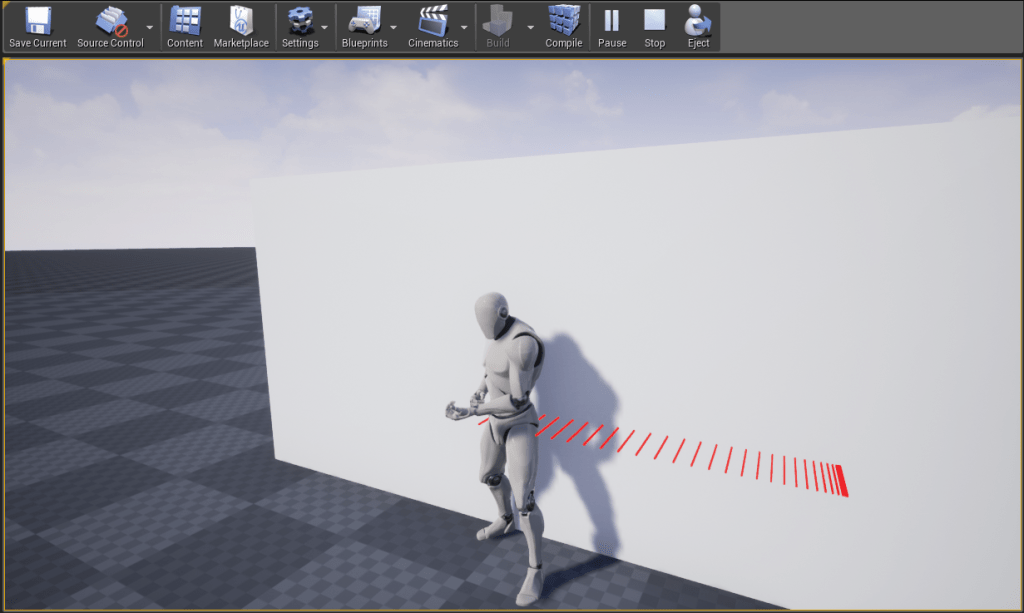
Cover System
So we are going to implement a cover system, but before we start let’s discuss what exactly is a cover system?
A cover system allows the player character use stationary or moving obstacles to avoid damage. For a system to be considered as a cover system, there must be some physical interaction with the source of cover and the virtual avatar.
There are many games from way back during 1970s which featured a cover system with destructible objects which the player could use like the arcade shooter Space Invaders (1978). Time Crisis (1995) was the first game which introduced a dedicated cover button that allowed the players to take cover behind in-game objects. Kill Switch (2003) is credited as the first game to feature cover system as its core game mechanic.
Soon the cover system evolved to allow the players to sneak and duck behind corners while observing enemy patrols. It was improved to feature a “detection gauge” that would be a measure of the visibility of the player character. Even the game’s AI characters were often able to take cover, call for backup and throw grenades from behind their cover etc.
I have played various games which involve some sort of cover system, a few of them which inspired me on implementing them being Tom Clancy’s Splinter Cell: Blacklist, Tom Clancy’s The Division and Watch_Dogs 2.
Implementing a Cover System in Unreal Engine 4
Now, we will be implementing a cover system. So it is easier to break it into small parts and implement each part separately.
For setting up a basic cover system, we will start with two classes.
First one will be the “Cover-Actor” which will consist of the static mesh which will be a visual representation of the cover and it will have a volume which when overlapped by the virtual avatar will indicate to the player that it can take cover. For now, there will not be any UI-indicator for that purpose.
Second one will the “Player-Character” which will handle the interaction with the “Cover-Actor”. When the player-controlled character can only take cover only when the character is inside the cover volume. For now we won’t be dealing with any character animations. Instead, we will be moving the capsule component of the Player Character.
ACoverActor
We will create the ACoverActor class from the AActor class and in the header file of the ACoverActor class we declare 3 properties which are as follows:
UPROPERTY(VisibleAnywhere, BlueprintReadOnly, Category="Cover System", meta=(AllowPrivateAccess="true"))
class USceneComponent* SceneComponent;

UPROPERTY(VisibleAnywhere, BlueprintReadOnly, Category="Cover System", meta=(AllowPrivateAccess="true"))
class UStaticMeshComponent* CoverMesh;

UPROPERTY(VisibleAnywhere, BlueprintReadOnly, Category="Cover System", meta=(AllowPrivateAccess="true"))
class UBoxComponent* CoverVolume;
We have added the SceneComponent here as we will be using it as our RootComponent, and the StaticMeshComponent which represents the visual for the cover will be the child of the SceneComponent.
The BoxComponent represents the volume which will be triggering the overlap events. For triggering the overlap events we need the following two functions declarations:
UFUNCTION()
void CoverVolumeBeginOverlap(UPrimitiveComponent* OverlappedComponent, AActor* OtherActor, UPrimitiveComponent* OtherComp, int32 OtherBodyIndex, bool bFromSweep, const FHitResult & SweepResult);

UFUNCTION()
void CoverVolumeEndOverlap(UPrimitiveComponent* OverlappedComponent, AActor* OtherActor, UPrimitiveComponent* OtherComp, int32 OtherBodyIndex);
In the constructor for the ACoverActor we will create the 3 components we declared and setup the attachments. Also we will need a separate trace channel for the StaticMeshComponent for being able to distinguish it from other static objects in the map.
So in the Project Settings -> Engine -> Collision tab, click on “New Trace Channel” and name it “CoverTrace” with the Default Response set to “Ignore”. After you click on Accept it will be show up as the following: (click on image to enlarge)

Now we add the following code in the constructor for the ACoverActor :
SceneComponent = CreateDefaultSubobject(TEXT("SceneComponent")); RootComponent = SceneComponent;
CoverMesh = CreateDefaultSubobject(TEXT("CoverMesh"));
CoverMesh->AttachToComponent(SceneComponent, FAttachmentTransformRules::SnapToTargetIncludingScale);
CoverMesh->SetCollisionResponseToChannel(ECollisionChannel::ECC_GameTraceChannel1, ECollisionResponse::ECR_Block);
CoverVolume = CreateDefaultSubobject(TEXT("CoverVolume"));
CoverVolume->AttachToComponent(CoverMesh, FAttachmentTransformRules::SnapToTargetIncludingScale);CoverVolume->SetBoxExtent(FVector(200.0f));
Here we make the SceneComponent declared in the header file as our RootComponent. Then we create the CoverMesh and make it a child of the SceneComponent we just created. Then we set the response to the collision channel ECC_GameTraceChannel1 – which represents the “CoverTrace” channel we created in the editor, to be ECR_Block. This means now the static mesh which we will assign for cover in the editor will behave differently from other static mesh which are placed in the level map. Similarly we create the CoverVolume which becomes a child of the SceneComponent and we set the extent of the box to be 200.0 units.
In the .cpp file we add the following code in the BeginPlay() function which makes sure the overlap events of the CoverVolume are bound to the overlap functions we created in the header file.
CoverVolume->OnComponentBeginOverlap.AddDynamic(this, &ACoverActor::CoverVolumeBeginOverlap);
CoverVolume->OnComponentEndOverlap.AddDynamic(this, &ACoverActor::CoverVolumeEndOverlap);
We will implement the CoverVolumeBeginOverlap and CoverVolumeEndOverlap functions after we create the APlayerCharacter class.
Don’t forget to add the following header files in the ACoverActor.cpp file.
#include "Components/SceneComponent.h"
#include "Components/StaticMeshComponent.h"
#include "Components/BoxComponent.h"
APlayerCharacter
We create the APlayerCharacter from the ACharacter base class. In the header file we add USpringArmComponent and UCameraComponent as follows:
UPROPERTY(VisibleAnywhere, BlueprintReadOnly, Category=Camera, meta=(AllowPrivateAccess="true"))
class USpringArmComponent* CameraBoom;

UPROPERTY(VisibleAnywhere, BlueprintReadOnly, Category=Camera, meta=(AllowPrivateAccess="true"))
class UCameraComponent* FollowCamera;
For the APlayerCharacter to respond to input from the user we add the following:
protected:
void MoveForward(float Value);
void MoveRight(float Value);
void CoverPressed();
virtual void SetupPlayerInputComponent(class UInputComponent* PlayerInputComponent) override;
In the APlayerCharacter.cpp file, we will bind the mouse/keyboard inputs in the SetupPlayerInputComponent() function for the three functions – MoveForward(float Value), MoveRight(float Value), and CoverPressed().
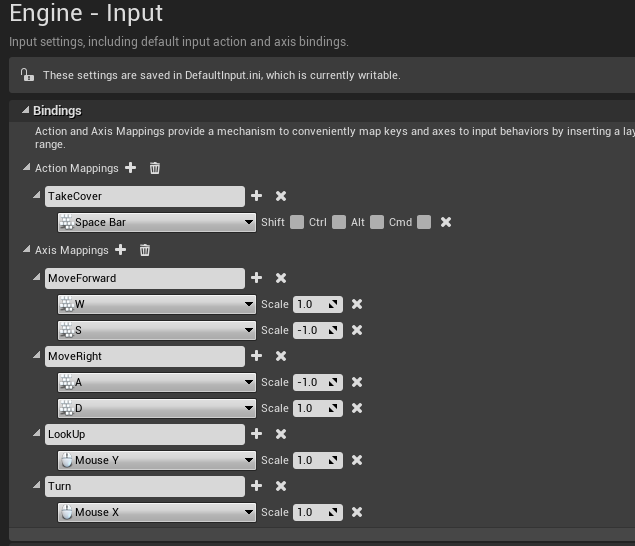
Then we switch back to Unreal Engine and go to Project Settings -> Input and create new Action Mapping for the “TakeCover” action and Axis Mapping for “MoveForward”, “MoveRight”, “Turn” and “LookUp” as follows:
We then add the following code involving the cover system in the header file.
public:
UFUNCTION(BlueprintCallable, Category="Cover System")
void SetIsInCoverVolume(bool Value);

UFUNCTION(BlueprintCallable, Category="Cover System")
void SetCurrentCoverMesh(class ACoverActor* CoverMesh);

protected:
UPROPERTY(VisibleAnywhere)
uint8 bIsInCoverVolume : 1;

UPROPERTY(VisibleAnywhere)
uint8 bIsCoverPressed : 1;

UPROPERTY(VisibleAnywhere)
uint8 bIsCovered : 1;

UPROPERTY(VisibleAnywhere)
FVector WallNormal;

UPROPERTY(VisibleAnywhere)
FVector WallLocation;

//offset distance from PlayerCharacter to left/right
UPROPERTY(EditAnywhere)
float SidewayTraceDistance;

//offset distance from PlayerCharacter to wall
UPROPERTY(EditAnywhere)
float WallForwardTraceDistance;

//distance between PlayerCharacter and wall when in cover
UPROPERTY(EditAnywhere)
float PlayerToWallDistance;

//the current cover in range
UPROPERTY(VisibleAnywhere)
class ACoverActor* CurrentCover;
void GetCover();
void LeaveCover();
bool CanMoveInCover(float Value);
The first function SetIsInCoverVolume(bool Value) will be used to set if the player character is inside the “CoverVolume” UBoxComponent of the CoverActor. If it is the CurrentCover property of the APlayerCharacter will be assigned using SetCurrentCoverMesh(ACoverActor* CoverMesh).
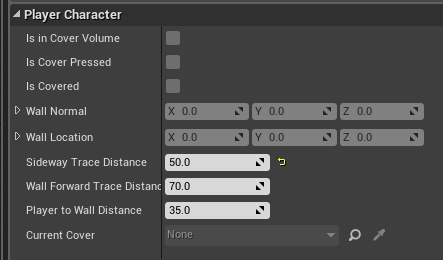
The WallNormal and WallLocation properties will be assigned when a line trace from APlayerCharacter to ACoverActor is successful. These properties have the specifier set to VisibleAnywhere to allow them to be visible in the editor. The properties SidewayTraceDistance, WallForwardTraceDistance, and PlayerToWallDistance are editable by the user and hence have the specifier EditAnywhere. SidewayTraceDistance is the distance offset from the player character’s capsule from where the line trace starts when trying to move left/right along the cover. The WallForwardTraceDistance is the distance for the forward lline trace to determine the cover and PlayerToWallDistance is the distance between the player character’s capsule center and the wall when in cover.
Now in the APlayerCharacter.cpp file, we add the following header files:
#include "GameFramework/SpringArmComponent.h"
#include "GameFramework/CharacterMovementComponent.h"
#include "Components/CapsuleComponent.h"
#include "Camera/CameraComponent.h"
#include "Kismet/KismetMathLibrary.h"
#include "Kismet/KismetSystemLibrary.h"
#include "DrawDebugHelpers.h"
#include "Public/Utility/Cover/CoverActor.h"
And the constructor of APlayerCharacter is implemented as follows:
GetCapsuleComponent()->InitCapsuleSize(42.0f, 96.0f);

//do not rotate when the controller rotates
bUseControllerRotationPitch = false;
bUseControllerRotationRoll = false;
bUseControllerRotationYaw = false;
GetCharacterMovement()->bOrientRotationToMovement = true;
GetCharacterMovement()->RotationRate = FRotator(0.0f, 540.0f, 0.0f);
GetCharacterMovement()->AirControl = 0.2f;
CameraBoom = CreateDefaultSubobject(TEXT("CameraBoom"));CameraBoom->SetupAttachment(RootComponent);
CameraBoom->TargetArmLength = 300.0f;
CameraBoom->bUsePawnControlRotation = true;
FollowCamera = CreateDefaultSubobject(TEXT("FollowCamera"));
FollowCamera->SetupAttachment(CameraBoom, USpringArmComponent::SocketName);
FollowCamera->bUsePawnControlRotation = false;

//cover related properties
bIsCovered = false;
bIsInCoverVolume = false;
bIsCoverPressed = false;
WallLocation = FVector::ZeroVector;
WallNormal = FVector::ZeroVector;
SidewayTraceDistance = 45.0f;
WallForwardTraceDistance = 70.0f;
PlayerToWallDistance = 35.0f;
In the constructor we setup the player character’s capsule size and create the USpringArmComponent and UCameraComponent components we defined in the header file. We follow it by setting up the initial values for the cover system related properties.
In the Tick(float DeltaSeconds) function we make sure to reset bIsCoverPressed to false when the player character is not inside the CoverVolume.
void APlayerCharacter::Tick(float DeltaSeconds)
{
    Super::Tick(DeltaSeconds);
    if (!bIsInCoverVolume)
    {
        bIsCoverPressed = false;
    }
}
We override the SetupPlayerInputComponent(UInputComponent* PlayerInputComponent) function and implement the Axis and Action mouse/keyboard bindings.
void APlayerCharacter::SetupPlayerInputComponent(UInputComponent* PlayerInputComponent)
{
    check(PlayerInputComponent);

    //axis bindings
    PlayerInputComponent->BindAxis("MoveForward", this, &APlayerCharacter::MoveForward);
    PlayerInputComponent->BindAxis("MoveRight", this, &APlayerCharacter::MoveRight);
    PlayerInputComponent->BindAxis("Turn", this, &APawn::AddControllerYawInput);
    PlayerInputComponent->BindAxis("LookUp", this, &APawn::AddControllerPitchInput);

    //action bindings
    PlayerInputComponent->BindAction("TakeCover", EInputEvent::IE_Pressed, this, &APlayerCharacter::CoverPressed);
}
The check is an assertion macro which is used to make sure that the PlayerInoutComponent is not nullptr and will halt execution if it is.
Now we implement the function CoverPressed() as follows:
void APlayerCharacter::CoverPressed()
{
    if (bIsInCoverVolume && !bIsCovered)
    {
        bIsCoverPressed = true;
        GetCover();
    }
    else if (bIsInCoverVolume && bIsCovered)
    {
        bIsCoverPressed = false;
        LeaveCover();
    }
}
We make sure that bIsCoverPressed can only be true only when the player character is inside the CoverVolume and leaves the cover when “TakeCover” action key is pressed while already in cover.
Now we implement the two public functions we declared in the header file – SetIsInCoverVolume() and SetCurrentCoverMesh()
void APlayerCharacter::SetIsInCoverVolume(bool Value)
{
    bIsInCoverVolume = Value;
}

void APlayerCharacter::SetCurrentCoverMesh(class ACoverActor* CoverMesh)
{
    CurrentCover = CoverMesh;
}
These two functions will be called in the overlap events of the ACoverActor class which we mentioned in the previous section.
So now we can implement the two overlap events of ACoverActor after including the header file of the APlayerCharacter as follows:
#include "Public/Player/PlayerCharacter.h"
 ...

void ACoverActor::CoverVolumeBeginOverlap(UPrimitiveComponent* OverlappedComponent, AActor* OtherActor, UPrimitiveComponent* OtherComp, int32 OtherBodyIndex, bool bFromSweep, const FHitResult & SweepResult)
{
    APlayerCharacter* tempPC = Cast(OtherActor);
    if (tempPC)
    {
        //in cover volume
        tempPC->SetIsInCoverVolume(true);
        tempPC->SetCurrentCoverMesh(this);
    }
}

void ACoverActor::CoverVolumeEndOverlap(UPrimitiveComponent* OverlappedComponent, AActor* OtherActor, UPrimitiveComponent* OtherComp, int32 OtherBodyIndex)
{
    APlayerCharacter* tempPC = Cast(OtherActor);
    if (tempPC)
    {
        //not in cover volume
        tempPC->SetIsInCoverVolume(false);
        tempPC->SetCurrentCoverMesh(nullptr);
    }
}
In above functions we cast the OtherActor to APlayerCharacter check if the overlapping actor is our player character.
Now time to implement the GetCover() function.
First we create a FHitResult and FCollisionQueryParams structures for storing information about the line trace. We then get the actual forward direction of the ACoverActor we are interacting with. We calculate the DotProductFactor by taking dot product of the cover mesh’s actual forward direction and player character’s forward direction, which gives a outcome of -1 or 1 based on if we are in the same direction as actual forward vector of the cover mesh or on the opposite side of it. Using the DotProductFactor we calculate the LineTraceEnd property and do a line trace.
For the LineTraceSingleByChannel we need to supply the trace channel which in our case is the “CoverTrace” i.e. ECC_GameTraceChannel1
//forward trace
FHitResult LineTraceHitResult = FHitResult(ForceInit);
FCollisionQueryParams LineTraceQueryParams = FCollisionQueryParams(TEXT("LineTraceQueryParams"), true, this);
FVector CoverMeshForwardDirection = CurrentCover->GetActorForwardVector();
float DotProductFactor = FVector::DotProduct(GetActorForwardVector(), CoverMeshForwardDirection) > 0.0f ? 1.0f : -1.0f;
const FVector LineTraceStart = GetActorLocation();
const FVector LineTraceEnd = LineTraceStart + (DotProductFactor) * (CoverMeshForwardDirection * WallForwardTraceDistance);
bool LineTraceOutput = GetWorld()->LineTraceSingleByChannel(LineTraceHitResult, LineTraceStart, LineTraceEnd, ECollisionChannel::ECC_GameTraceChannel1, LineTraceQueryParams);

//debug line
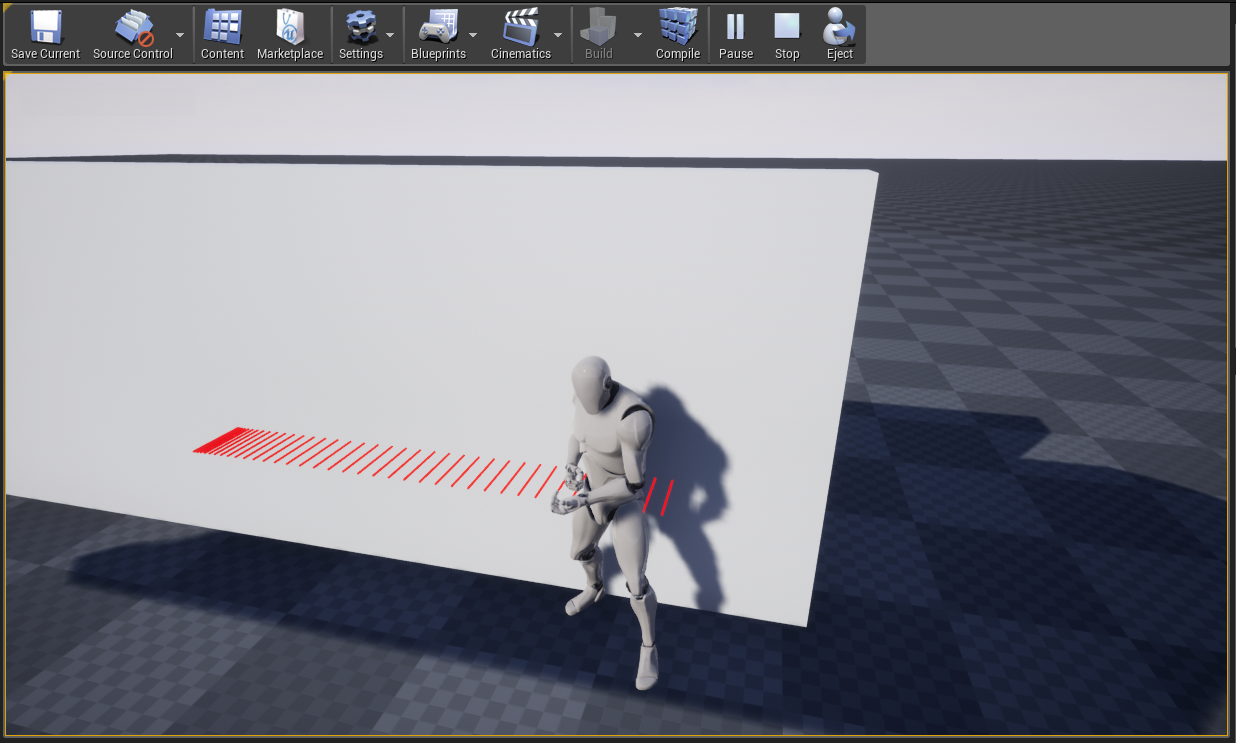
DrawDebugLine(GetWorld(), LineTraceStart, LineTraceEnd, FColor::Red, false, 5.0f, 0, 1.0f);
If the line trace was successful i.e. LineTraceOutput was true, then we set the WallLocation and the WallNormal from the structure we created. Then we calculate the TargetLocation and TargetRotation for the player character to move to and then move the capsule component of the player character.
if (LineTraceOutput)
{
    WallLocation = LineTraceHitResult.Location;
    WallNormal = LineTraceHitResult.ImpactNormal;
    float XDistance = GetActorForwardVector().X * PlayerToWallDistance;
    float YDistance = GetActorForwardVector().Y * PlayerToWallDistance;

    //the target location
    FVector TargetLocation = FVector(WallLocation.X - XDistance, WallLocation.Y - YDistance, GetActorLocation().Z);

    //the target rotation
    FVector UpVector = GetCapsuleComponent()->GetUpVector();
    FRotator TargetRotation = UKismetMathLibrary::MakeRotFromXZ(WallNormal, UpVector);
    FLatentActionInfo LatentAction;
    LatentAction.CallbackTarget = this;

    //move
    UKismetSystemLibrary::MoveComponentTo(GetCapsuleComponent(), TargetLocation, TargetRotation, true, false, GetWorld()->GetDeltaSeconds() * 10.0f, false, EMoveComponentAction::Move, LatentAction);

    //set PlayerCharacter to be in cover
    bIsCovered = true;
    GetCharacterMovement()->bOrientRotationToMovement = false;
}
LeaveCover() function is a simple one.
void APlayerCharacter::LeaveCover()
{
    bIsCovered = false;
    GetCharacterMovement()->bOrientRotationToMovement = true;
}
We will now implement the CanMoveInCover(float Value) function.
The function argument Value is set from the input values, if Value is negative it means the player intends to move left but since when the player character is in cover it is facing the camera it means the player character actually needs to move in the right direction and vice-versa.
We first declare the FHitResult and FCollisionQueryParams like before as well as storing the cover mesh’s forward direction and calculating the DotProductFactor. In addition to those we calculate the UnitRightVector of the player character by calculating the cross product using the capsule component’s Up Vector and the player character’s forward direction and dividing the resulting vector with the magnitude of the resulting vector.
//line trace parameters
FHitResult LineTraceHitResult = FHitResult(ForceInit);
FCollisionQueryParams LineTraceQueryParams = FCollisionQueryParams(TEXT("LineTraceQueryParams"), true, this);
FVector CoverMeshForwardDirection = CurrentCover->GetActorForwardVector();
float DotProductFactor = FVector::DotProduct(GetActorForwardVector(), CoverMeshForwardDirection) > 0.0f ? 1.0f : -1.0f;
FVector LineTraceStart;
FVector LineTraceEnd;
FVector UnitRightVector = FVector::CrossProduct(GetCapsuleComponent()->GetUpVector(), GetActorForwardVector()) / (FVector::CrossProduct(GetCapsuleComponent()->GetUpVector(), GetActorForwardVector())).Size();
Now if the player character intends to move left the capsule component will actually need to move right and if the player character intends to move right the capsule component will actually move left as discussed above.
//left pressed - move to right
if (CurrentCover && Value < 0.0f)
{
	bool bCanMoveLeft = false;
	LineTraceStart = GetActorLocation() + (UnitRightVector * SidewayTraceDistance);
	LineTraceEnd = LineTraceStart + (-DotProductFactor * CoverMeshForwardDirection * WallForwardTraceDistance);

	bCanMoveLeft = GetWorld()->LineTraceSingleByChannel(LineTraceHitResult, LineTraceStart, LineTraceEnd, ECollisionChannel::ECC_GameTraceChannel1, LineTraceQueryParams);

	//debug line
	DrawDebugLine(GetWorld(), LineTraceStart, LineTraceEnd, FColor::Red, false, 5.0f, 0, 1.0f);

	if (bCanMoveLeft)
	{
		WallLocation = LineTraceHitResult.Location;
		WallNormal = LineTraceHitResult.ImpactNormal;
	}

	return bCanMoveLeft;
}

//right pressed - move to left
else if (CurrentCover && Value > 0.0f)
{
	bool bCanMoveRight = false;
	LineTraceStart = GetActorLocation() + (-UnitRightVector * SidewayTraceDistance);
	LineTraceEnd = LineTraceStart + (-DotProductFactor * CoverMeshForwardDirection * WallForwardTraceDistance);

	bCanMoveRight = GetWorld()->LineTraceSingleByChannel(LineTraceHitResult, LineTraceStart, LineTraceEnd, ECollisionChannel::ECC_GameTraceChannel1, LineTraceQueryParams);

	//debug line
	DrawDebugLine(GetWorld(), LineTraceStart, LineTraceEnd, FColor::Red, false, 5.0f, 0, 1.0f);

	if (bCanMoveRight)
	{
		WallLocation = LineTraceHitResult.Location;
		WallNormal = LineTraceHitResult.ImpactNormal;
	}

	return bCanMoveRight;
}
else
{
	return false;
}
We return the outcome of the line trace, and if the line trace succeeds then we update the WallNormal and WallLocation as before.
Now with all the important coding done, we implement the MoveForward() and MoveRight() functions.
In the implementation of the MoveForward() we make sure that the Controller is not nullptr and when the player character is in cover, they cannot move backwards with respect to the player’s capsule component.
void APlayerCharacter::MoveForward(float Value)
{
    //when in cover
    if (Controller && CurrentCover && bIsCovered)
    {
        if (Value < 0.0f)
        {
            LeaveCover();
        }
    }
    //when not in cover
    else if (Controller)
    {
        const FRotator Rotation = Controller->GetControlRotation();
        const FRotator YawRotation(0.0f, Rotation.Yaw, 0.0f);
        const FVector Direction = FRotationMatrix(YawRotation).GetUnitAxis(EAxis::X);
        AddMovementInput(Direction, Value);
    }
}
When in cover trying to move left or right will result in the capsule component moving parallel to the cover, so we calculate the WallParallelDirection.
void APlayerCharacter::MoveRight(float Value)
{
    //when in cover
    if (Controller && CurrentCover && bIsCovered)
    {
        if (Value != 0.0f)
        {
            bool bCanMoveInCover = CanMoveInCover(Value);
            if (bCanMoveInCover)
            {
                FRotator RotationFromXZ = UKismetMathLibrary::MakeRotFromXZ(WallNormal * -1.0f, GetCapsuleComponent()->GetUpVector());
                FVector WallParallelDirection = UKismetMathLibrary::GetRightVector(RotationFromXZ);
                AddMovementInput(WallParallelDirection, Value);
            }
        }
    }
    //when not in cover
    else if (Controller)
    {
        const FRotator Rotation = Controller->GetControlRotation();
        const FRotator YawRotation(0.0f, Rotation.Yaw, 0.0f);
        const FVector Direction = FRotationMatrix(YawRotation).GetUnitAxis(EAxis::Y);
        AddMovementInput(Direction, Value);
    }
}
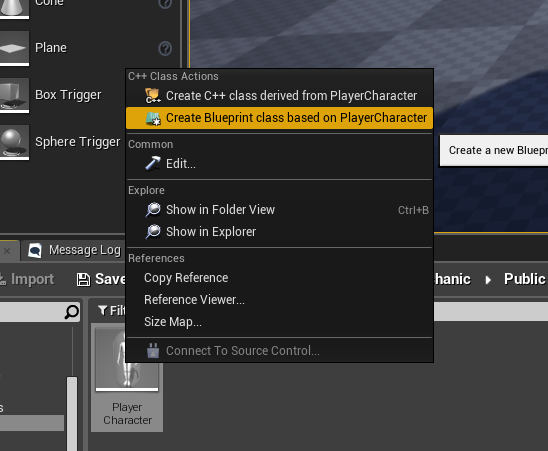
Now we create blueprint classes from the ACoverActor and APlayerCharacter C++ classes.
Now in the class constructor, setup the to be the blueprint class of APlayerCharacter we created above.
#include "ConstructorHelpers.h"

ADefaultGameMode::ADefaultGameMode()
{
    static ConstructorHelpers::FClassFinder PlayerCharacterClassFinder(TEXT("/Game/Blueprints/Player/BP_PlayerCharacter"));
    DefaultPawnClass = PlayerCharacterClassFinder.Class;
}
In the argument to FClassFinder we give the location of the blueprint class, in my case it is “/Game/Blueprints/Player/BP_PlayerCharacter” where BP_PlayerCharacter is the name of the blueprint file I created.
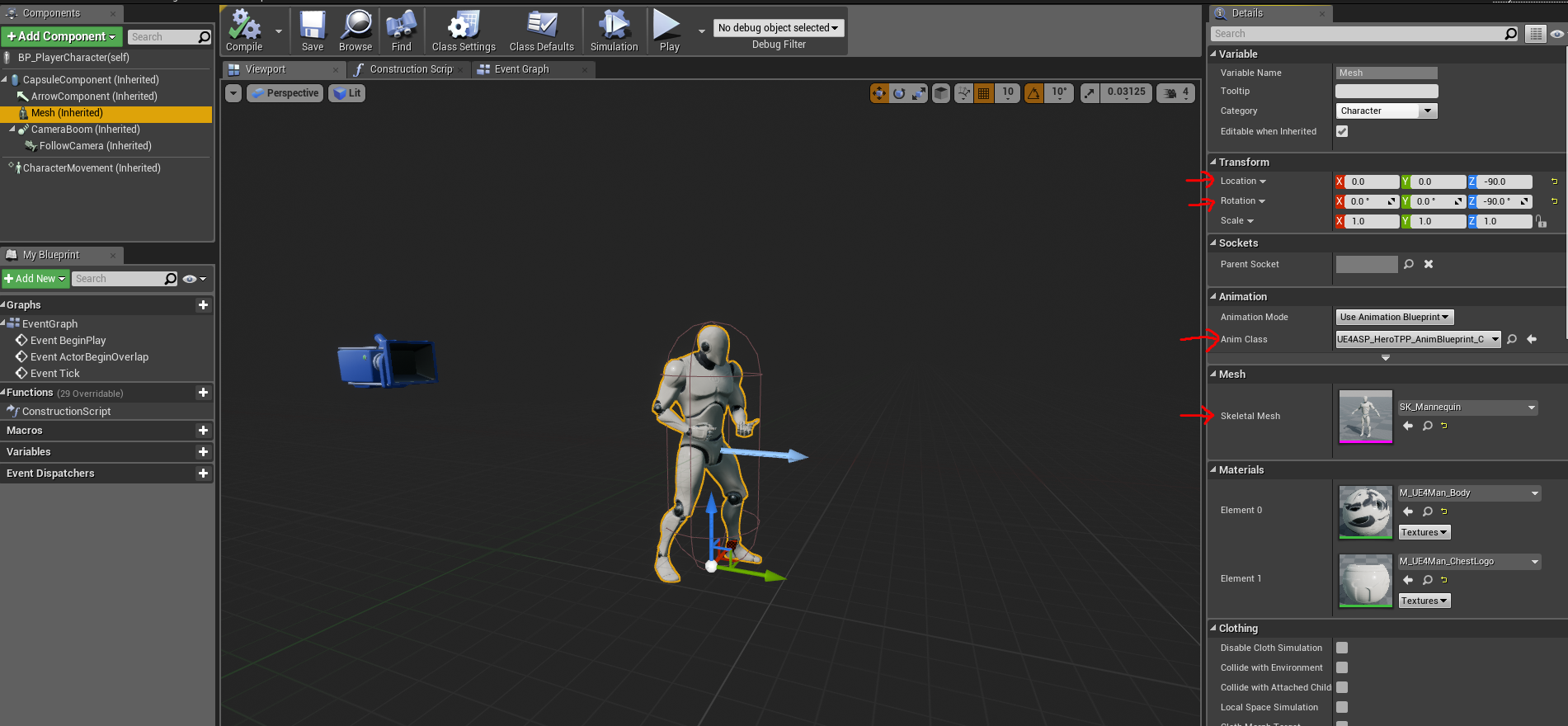
For the character mesh, I used the mannequin from the Animation Starter Pack from the Unreal Engine Marketplace.
I setup the BP_PlayerCharacter as follows:
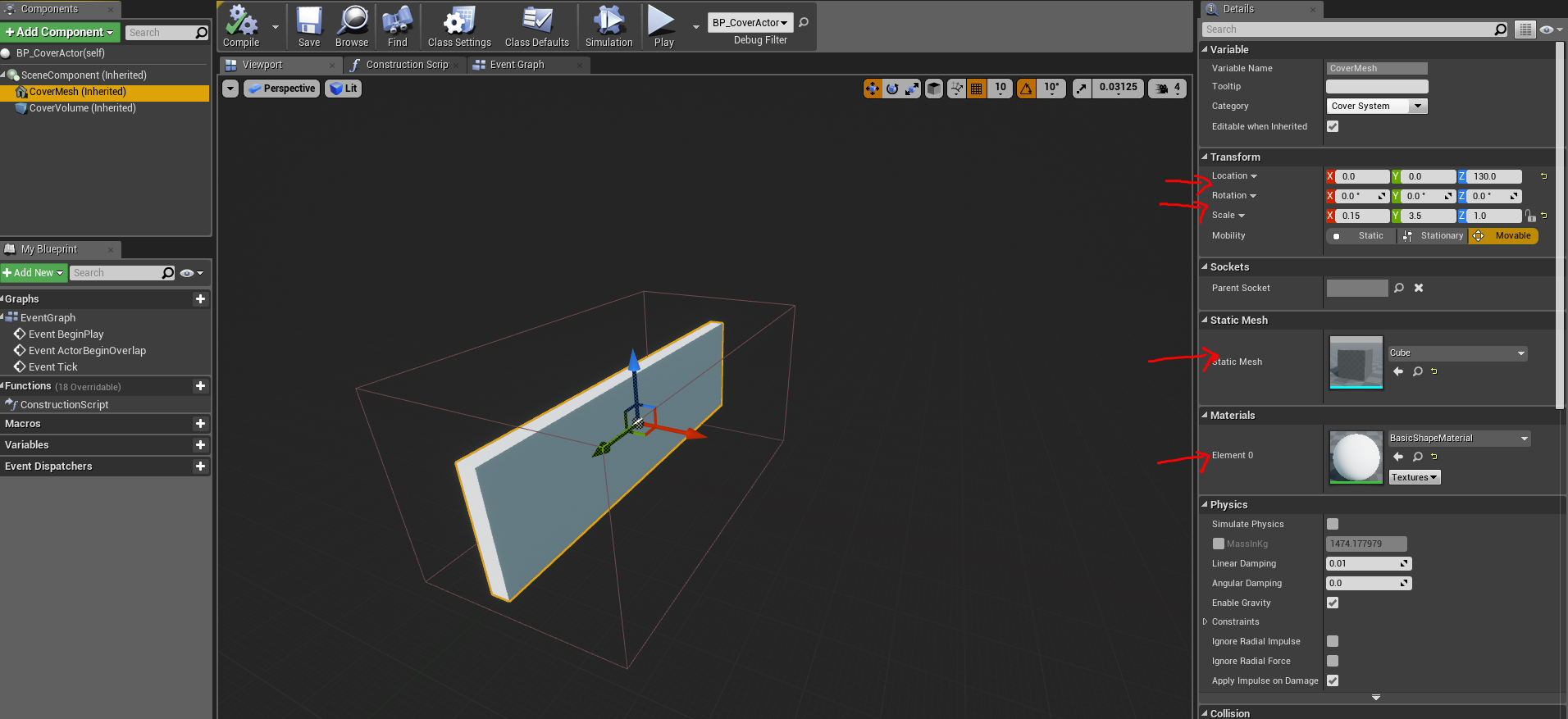
For the BP_CoverActor‘s, CoverMesh I used the following properties:
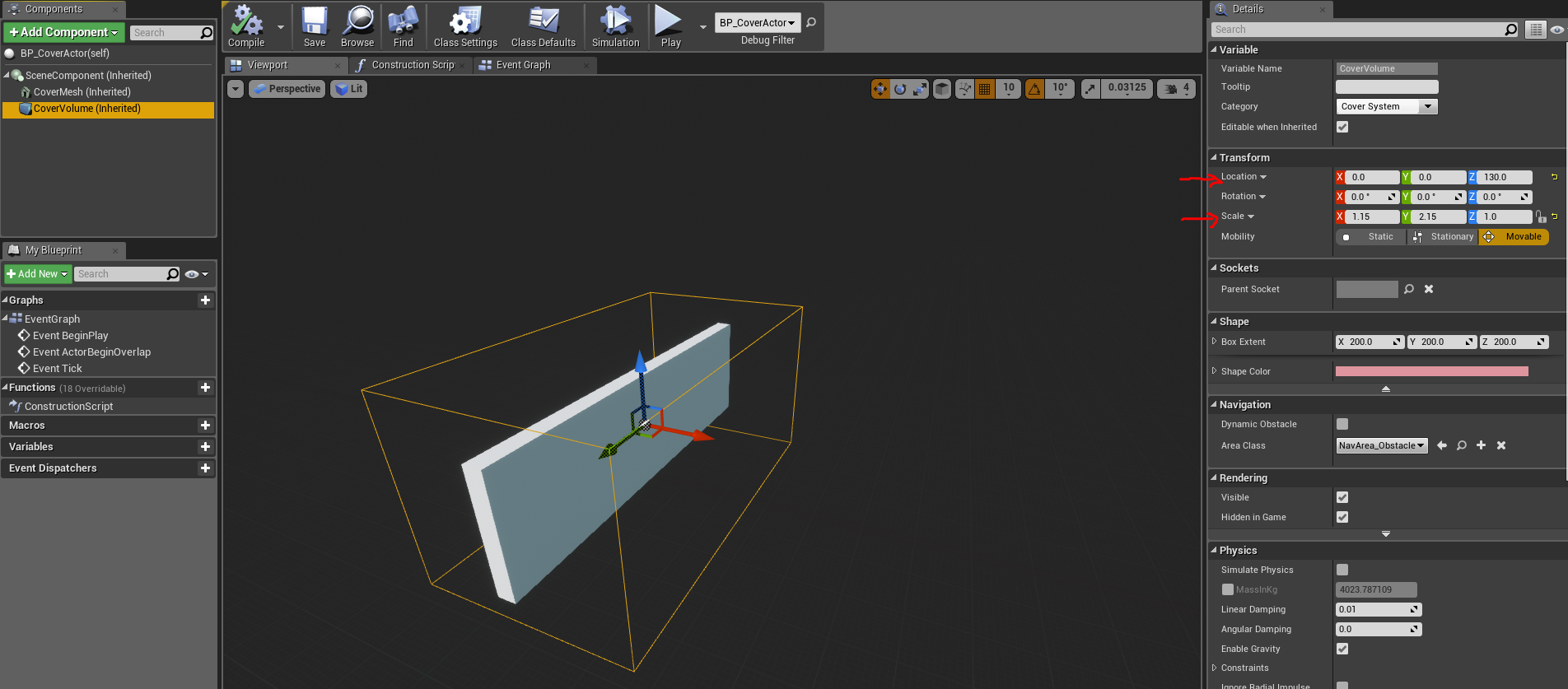
and for the CoverVolume I used:
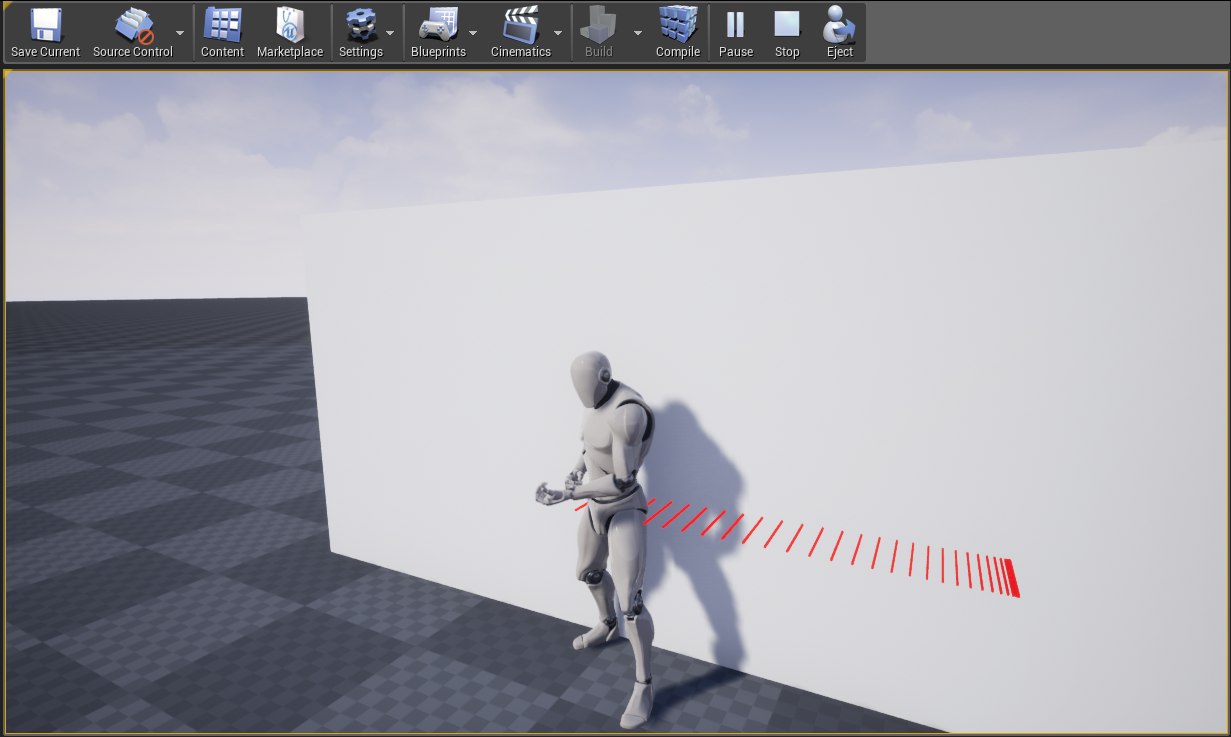
Now place a BP_CoverActor in the level map and test it.
Moving Right when in cover:
Moving Left when in cover:
What’s Next
In this post we have made a very simple cover system, but it is a lot of improvements to be done for example we cannot move from one cover to adjacent cover like many third-person role playing games have.
In the next post, we will be improving the cover system to allow the player character to move to adjacent covers. Stay tuned!
NOTE: The source code can be found at my GitHub.


 Chiranjibee Satapathy
Leave a reply to Chiranjibee Satapathy Cancel reply